The Node.js Event Loop📌⚡

⚡Understanding the Event Loop in Node.js
If you’ve ever heard that “Node.js is single-threaded but still handles thousands of requests efficiently”, it probably sounded a bit magical.
The secret behind this magic is "The Event Loop".
The Problem: Single Thread Limitation
Node.js runs on a single thread. That means:
It can do one thing at a time
No parallel execution like multi-threaded systems
Now think:
What happens if one task takes too long?
Example:
readFile("bigfile.txt"); // takes 5 seconds
If Node.js waited for this to finish, everything else would be blocked
That’s where the event loop comes in.
🧩What is the Event Loop?
Think of the event loop as a smart task manager.
It continuously checks:
“Is there anything to execute?”
“Can I move something from waiting to execution?”
It helps Node.js handle multiple operations without blocking the main thread.
So Why the Event Loop?
Node.js needs the event loop to avoid blocking.
It allows Node.js to:
Start a task
Offload it (like file read, API call)
Move on to the next task
Come back when the result is ready
Think of It Like This
Node.js = One worker
Event Loop = Smart manager
Without the manager:
Worker waits for every task to finish → super slow
With the manager:
Worker keeps switching tasks → super efficient
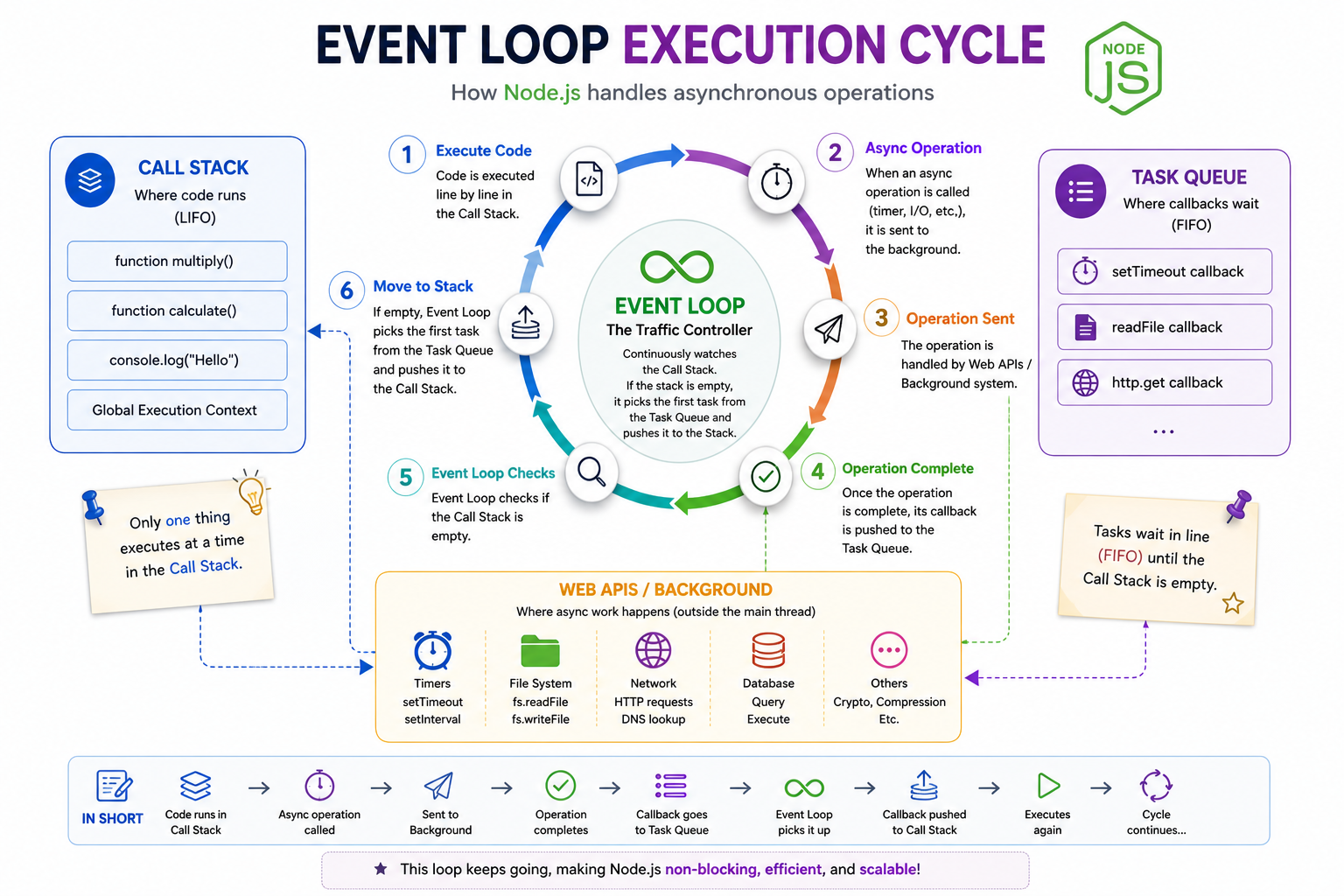
♦️Task Queue vs Call Stack
Think of Node.js like a small system with two main areas:
Call Stack → where work is happening right now
Task Queue → where work is waiting its turn
📌 Call Stack (Execution Area)
This is where code runs immediately
Works like a stack (Last In, First Out)
Only one task at a time
Example :
console.log("Hello");
This goes straight into the call stack and executes instantly.
📥 Task Queue (Waiting Area)
Stores callbacks of async operations
Tasks stay here until the stack is empty.
Example:
setTimeout(() => {
  console.log("Done");
}, 2000);
The callback doesn’t run immediately
It goes to the task queue after 2 seconds
⚙️ How Async Operations Are Handled in Node.js
Node.js doesn’t do long tasks itself—it delegates them.
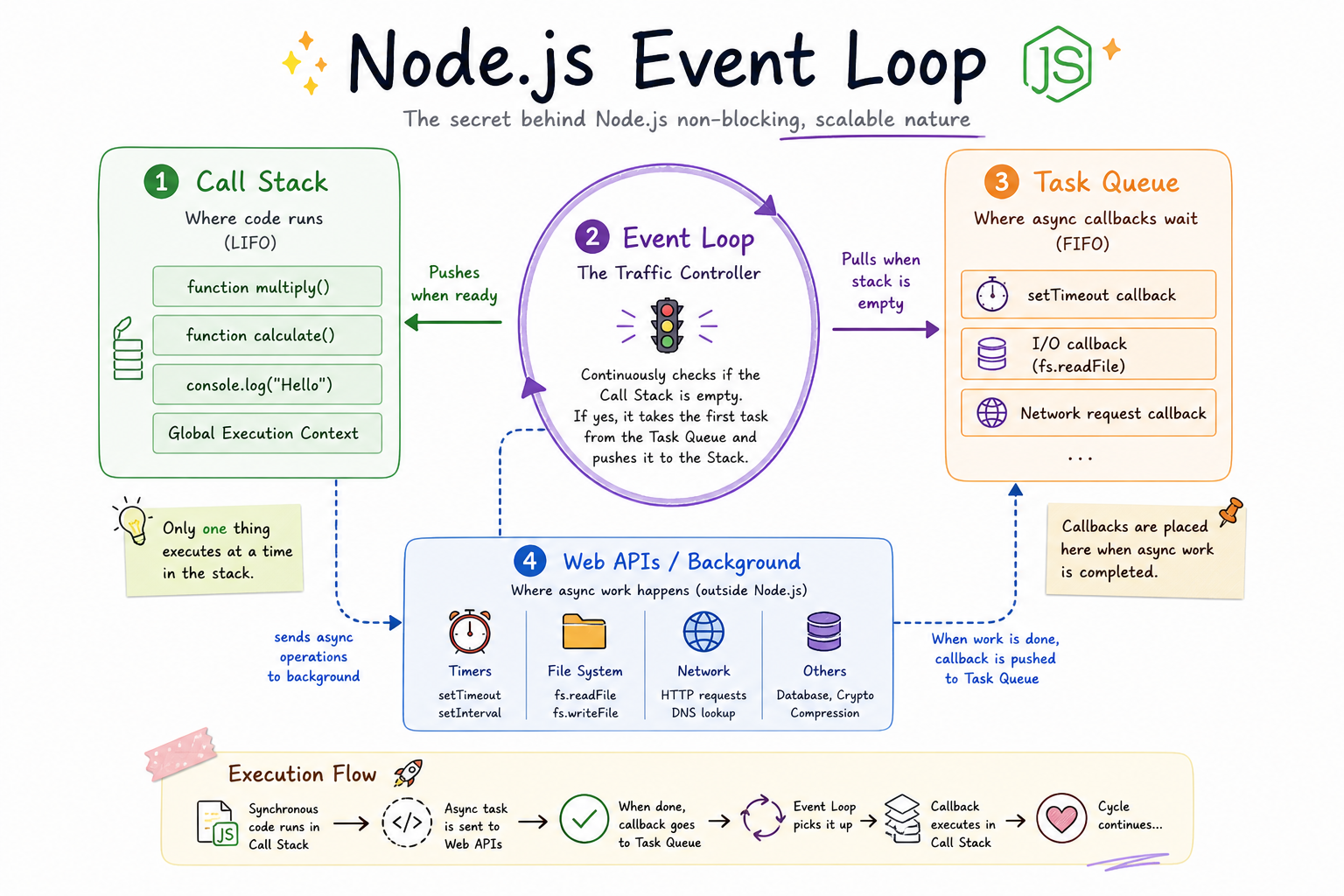
What happens step-by-step:
Code starts executing in the call stack
When an async task appears (like file read, API call, timer):
- Node.js sends it to background (system / APIs)
Node.js does NOT wait ❌
It continues executing other codeOnce the async task is done:
- Its callback goes to the task queue
The event loop checks:
“Is the stack empty?”
If yes → moves callback to stack → executes
Example
console.log("Start");

setTimeout(() => {
  console.log("Async Done");
}, 2000);

console.log("End");
Output:
Start End Async Done
Because Node.js doesn’t wait—it keeps moving.
Imagine:
Call Stack = Chef cooking
Task Queue = Orders waiting
Event Loop = Waiter managing orders
👨🍳 Chef can cook only one dish at a time
🧾 Orders keep coming
🧑💼 Waiter ensures the chef always has work
No chaos. No blocking. Smooth flow.
⏱️ Timers vs I/O Callbacks (High-Level)
Both are async, but they behave slightly differently.
🕒 Timers
Examples:
setTimeout,setIntervalRun after a minimum time delay
Important:
“2 seconds” means at least 2 seconds, not exactly.
Because:
- If the call stack is busy → it will wait more
📂 I/O Callbacks
Examples:
File system (
readFile)Database calls
Network requests
These run when:
The operation is fully completed
📈 Role of Event Loop in Scalability
This is the real power of Node.js 🔥
🚫 Traditional Approach (Without Event Loop)
One request = One thread
More users = More threads
Result:
High memory usage
Slower performance
✅ Node.js Approach (With Event Loop)
One thread + event loop
Async tasks handled in background
No waiting/blocking
🎯 Conclusion
The event loop is what makes Node.js powerful despite being single-threaded. Instead of waiting for tasks to finish, it smartly manages them by offloading long operations and executing callbacks only when the system is ready.
This non-blocking behavior allows Node.js to handle multiple requests efficiently, making it highly scalable and perfect for real-time applications.


